
Welcome to the Step Up Japanese blog archive!
Although I’m not currently adding new posts to the blog, you’ll find plenty of Japanese learning tips, study advice, and resources to explore here.
Browse the blog index to view a complete list of posts.
For the latest news, course updates, and Japanese learning tips from Step Up Japanese, sign up for my newsletter.
Search this blog:

How to Read The Japanese News (Or Any Japanese Website!) with Rikaichan
When I first moved back to Brighton from Japan I had a lot of time on my hands. I also didn't have a job, so I was desperate for free Japanese reading material.
So I started borrowing Japanese books from the library.
This plan was not exactly a success. It turns out reading Twilight in Japanese is only slightly more entertaining than reading it in English.
But we are really lucky to live in a world where, if you have internet access, you can read just about anything you want in Japanese online. And the news is a great place to start.

When I first moved back to the UK from Japan I had a lot of time on my hands. I also didn't have a job, so I was desperate for free Japanese reading material.
So I started borrowing Japanese books from the library.
This plan was not exactly a success. It turns out reading Twilight in Japanese is only slightly more entertaining than reading it in English.
But we are really lucky to live in a world where, if you have internet access, you can read just about anything you want in Japanese online. And the news is a great place to start.
If you can't read fluently yet, looking at a page of Japanese text can be intimidating. You don't know the meaning of the word, or even how to sound it out.
You need a dictionary - a really smart free one like Rikaichan. Rikaichan is a browser add-on that works as a pop-up dictionary. I used it every day for years, and I love it. Let's take a look at how it works, and start reading the news!
How Rikaichan works

Here we are on the website of the Asahi Shimbun, one of Japan's largest national newspapers.
I hover the cursor over the word 音楽. Rikaichan's little blue pop up tells me the reading of the word (おんがく ongaku) and what it means - "music".
Rikaichan also shows us the dictionary entries for individual kanji (Chinese characters).
Here, it's showing 音, the first character in the word 音楽, and telling us that 音 means "sound".
Learn where words begin and end
Standard written Japanese doesn't have spaces between words so if you're looking at unfamiliar words, it can be hard to know where each word starts and finishes.
Rikaichan is pretty smart at doing that bit for you.
Here, in the below example, it knows that 九州 (Kyushu island) is one word, and 豪雨 (torrential rain) is the next, separate word.

How to get it
So that's what Rikaichan does. Here's how to get started with it!
1) Get the right browser
Rikaichan and its "little brother" Rikaikun are for the web browsers Firefox and Chrome. If you're not using one of those, you'll need to download the browser first.
It's worth it. I used Firefox religiously for years just so I could use Rikaichan to get my morning news.
As far as I know the add-on doesn't work on mobile, unfortunately. (There's a similar-looking app called Wakaru for iOS - if you've used it, let me know what you think.)
2) Install Rikaichan or Rikaikun
Which one do you need? Rikaichan and Rikaikun are the same add-on, but for Firefox and Chrome. So, download and install Rikaichan from the Mozilla add ons page, or Rikaikun from the Chrome Web Store.

3) Download a dictionary
Rikaichan needs a dictionary to pull readings and meanings from, so after you've installed the add-on, you'll be prompted to install at least one dictionary file. If English is your first language, you want the "Japanese - English" dictionary.
I recommend installing the "Japanese Names" dictionary too, so that Rikaichan can identify common names when they pop up. That way, it'll know that 中田 is Nakada, a common Japanese surname, and doesn't just mean "middle of the ricefield".
4) Turn Rikaichan on
You probably won't want Rikaichan on all the time. Sometimes you'll want to read without a dictionary, and sometimes you won't be reading Japanese. You can turn it off and on when you like. Turn Rikaichan on, and let's give it a go.
Read everything!
Years ago when I started using Rikaichan, I set myself a challenge to read one headline with it every day.
Next, I made myself read three headlines per day. Then five. Then the first paragraph of an article. Eventually I was reading entire news articles, and using the dictionary less and less.
These days I get the Asahi Shimbun news straight to my inbox, because I don't need to look up words often enough to use Rikaichan any more.
But it was a completely invaluable part of my language learning journey. And it's definitely more interesting than reading Twilight in Japanese.
Updated 23rd Oct 2020

Plateaus in Language Learning and How to Overcome Them
Do you remember the first conversation you ever had in a foreign language?
The first three years I was learning Japanese I basically studied quite hard for tests and barely opened my mouth. I liked kanji, and what I saw as the oddness of the Japanese language. Three "alphabets"! A million different ways of counting things! I liked hiragana - so pretty! I studied hard and thought my university Japanese exams were easy.
Then, on holiday in China, I met a Japanese woman (at a super-interesting Sino-Japanese cultural exchange club, but that's a story for another time). I tried to speak to her in Japanese. And I couldn't say anything.

Do you remember the first conversation you ever had in a foreign language?
The first three years I was learning Japanese I basically studied quite hard for tests and barely opened my mouth.
I liked kanji, and what I saw as the oddness of the Japanese language. Three "alphabets"! A million different ways of counting things! I liked hiragana - so pretty! I studied hard and thought my university Japanese exams were easy.
Then, on holiday in China, I met a Japanese woman (at a super-interesting Sino-Japanese cultural exchange club, but that's a story for another time). I tried to speak to her in Japanese. And I couldn't say anything.
I told this nice, patient lady that I was studying Japanese and she asked me how long I was staying in China for. I wanted to tell her I was going back to England next Thursday, but instead I said 先週の水曜日に帰ります (senshuu no suiyoubi ni kaerimasu) - "I'll go back last Wednesday."
OOPS.
I think about this day quite a lot because it shows, I think, that although I'd studied lots of Japanese at that point my communicative skills were pretty poor. I considered myself an intermediate learner, but I couldn't quickly recall the word for Wednesday, or the word for last week.
I realised at that point that I hadn't made much real progress in the last two years. The first year I zipped along, memorising kana and walking around my house pointing at things saying "denki, tsukue, tansu" (lamp, desk, chest of drawers) But after that my Japanese had plateaued.
So, I started actively trying to speak - I took small group lessons, engaged in them properly, did the prep work. I wrote down five sentences every day about my day and had my teacher check them. I met up with a Japanese friend regularly and did language exchange - he corrected my grammar and told me when I sounded odd (thanks, Kenichi!)

(Most of this happened in Japan, but like I said, you don't need to live in Japan to learn Japanese.)
And I came out of the plateau. I set myself a concrete goal - to pass the JLPT N3. The JLPT (Japanese Language Proficiency Test) is a standardised test in Japanese, for non-native speakers. N3 is the middle level - intermediate.
Once I’d passed that, I started aiming for N2, the next level up. I had some job interviews in Japanese, a terrifying and fascinating experience.
I wanted to get a job with a Board of Education, and a recruiter told me you needed N1 - the highest level of the JLPT - for that, so I started cramming kanji and obscure words. I was back on the Japanese-learning train.
I didn't pass N1 though, not that time.
And I was bored of English teaching and didn't want to wait to pass the test before I got a job using Japanese - that felt a bit like procrastinating - so I quit my English teaching job and got a job translating wacky entertainment news.
And after six months translating oddball news I passed the test.
That's partly because exams involve a certain amount of luck and it depends what comes up. But I also believe it's because using language to actively do something - working with the language - is a much, much better way of advancing your skills than just "studying" it.
Thanks to translation work, I was out of the plateau again. Hurrah!
When you're in the middle of something - on the road somewhere - it's hard to see your own development.
Progress doesn't move gradually upwards in a straight line. It comes in fits and starts.
Success doesn't look like this:

It looks like this:

And if you feel like you're in a slump at the moment, there are two approaches.
One is to trust that - as long as you're working hard at it - if you keep plugging away, you'll suddenly notice you've jumped up a level without even realising. You're working hard? You got this.
The other approach is to change something. Make a concrete goal. Start something new. Find a new friend to talk to or a classmate to message in Japanese. Talk to the man who owns the noodle shop about Kansai dialect. Write five things you did each day in Japanese. Take the test. Apply for the job. がんばる (gambaru; “try your best”).
Originally posted February 2017
Updated 7th April 2020

Useful Apps to Download Before Your Trip To Japan (2019 Update)
If you just love missing your bus because you waited in the wrong place, overpaying for things because you can't remember the exchange rate, or wandering around for hours looking for a wi-fi spot in vain - stop reading now, because this one's not for you.
I'd like to share with you five super-useful apps to download before you travel to Japan!
Whatever you've got planned in Japan, these apps should get you well-prepared.
If you just love missing your bus because you waited in the wrong place, overpaying for things because you can't remember the exchange rate, or wandering around for hours looking for a wi-fi spot in vain - stop reading now, because this one's not for you.
I'd like to share with you some super-useful apps to download before you travel to Japan!
Whatever you've got planned in Japan, these apps should get you well-prepared.
1) Norikae Annai - in English!

Norikae Annai is Japan's most-downloaded travel app. It's easier to navigate than Hyperdia, much more nicely designed and more user-friendly. The catch used to be that it was only available in Japanese. But now it’s available in an English version too, called Norikae Annai - Japan Transit Planner.
Norikae Annai - Japan Transit Planner: App Store | Google Play
2) Tokyo Subway Navigation

I LOVE the Tokyo Subway Navigation app, because as well as transfer information it also has a fully offline, pinch-and-zoom map of - you guessed it - Tokyo's metro system.
Good for getting to grips with (what often seems like) the world's most complex underground rail system!
Tokyo Subway Navigation: App Store | Google Play
3) Apps for Free Wi-Fi

Even if you don't want to be connected all the time, you'll probably want wifi at some point on your travels. Japan Travel by Navitime is an app with an offline map showing free wifi spots. It also has free downloadable offline maps of all the major cities in Japan.
Japan Connected-free Wi-Fi, similarly, has an offline map showing free wifi.
(Or you could just do what I do on holiday and stand outside McDonalds pretending to wait for someone while actually using the free internet. That's cool too, right?)
Japan Travel by Navitime: App Store | Google Play
Japan Connected-free Wi-Fi: App Store | Google Play
4) XE Currency

Not Japan-specific, but definitely useful.
Until the exchange rate hits a nice easy number like 100 yen to the pound, you'll probably want a currency converter so you can figure out how far your spending money's going to go. And the XE converter works offline, too.
XE Currency: App Store | Google Play
So that's what's in my "essential Japan travel apps" folder! What's in yours? Let me know in the comments.
First published March 2016; updated 15 October, 2019
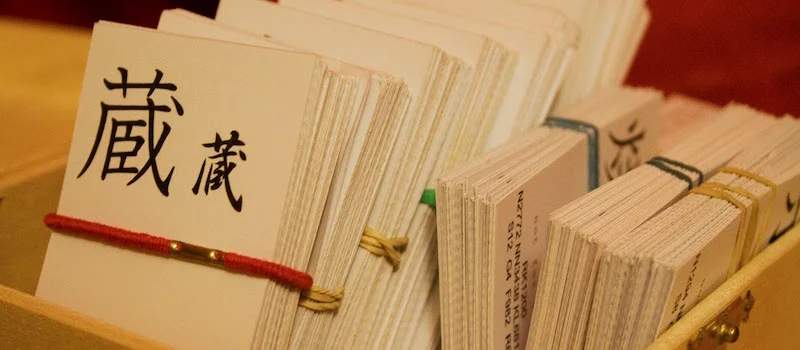
How to Use Anki to Not Forget Vocabulary
Lots of you probably use flashcards already. Why not use really, really clever ones?
Imagine you're studying Japanese vocabulary with a set of flashcards. You go through the cards one by one, putting them into a "pass" pile if you remembered them, and a "fail" pile if you didn't.
When you finish, you work through the "fail" pile again. You get about half of them right.
The next day, you go through all the cards again. It takes ages, and it's boring - you did all these yesterday…

You want to use flashcards. Why not use really, really clever ones?
Imagine you're studying Japanese vocabulary with a set of paper flashcards. You go through the cards one by one, putting them into a "pass" pile if you remembered them, and a "fail" pile if you didn't.
When you finish, you work through the "fail" pile again. You get about half of them right.
The next day, you go through all the cards again. It takes ages, and it's boring - you did all these yesterday.
Or maybe you start with the "fail" pile. But this card pile is smaller, so when the cards come up, you just remember the fact that you failed them yesterday!
This approach is okay, if you’re enjoying yourself. (Anything is okay, as long as you're having fun. This is my basic approach to language learning).
But you can make flashcards much more efficient - and stop wasting your time - with a spaced repetition system like Anki.
The power of active recall
When you use flashcards to test yourself, you're engaging in active recall - you're pushing your brain to remember something. This is the most effective way to commit things to memory.
You know that feeling when you're struggling to remember a word, and then finally get to it? That's active recall.
At that moment, you've just cemented the correct meaning of the word in your mind. And you'll remember it much quicker next time.
What is Anki?
Anki is a spaced repetition system (SRS) - a system for remembering things. It's free for PC / Mac, and Android. The iPhone app is not free (it’s £23.99), so I'd try it out on a computer first and see if you like it.
(Then again, it might be the best £23.99 you ever spend...)
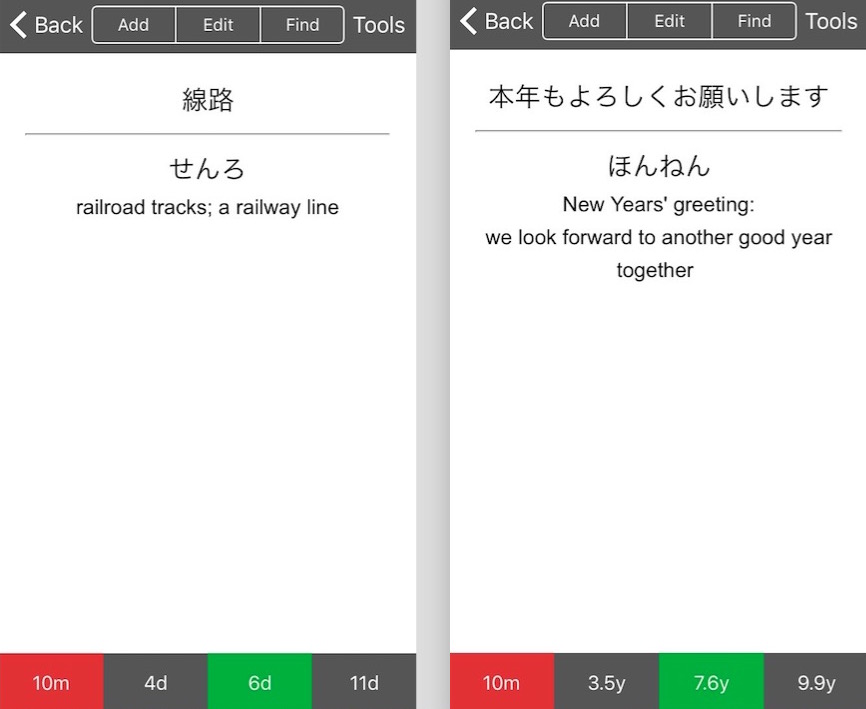
Anki shows you digital flashcards and tests you. It then spaces out the cards into the future, depending on how difficult you found them.
If you don't remember a word, Anki shows you it again in 10 minutes.
If you said it's easy, it might show you in three days. If in three days it's still easy, it waits seven days before it tests you on that word again.
If you keep getting it right, the interval increases exponentially, until Anki knows it'll be years before you forget that word. When you get it wrong, Anki knows you need to practice that word again soon.
So Anki sorts the “piles” of flashcards for you, testing you on material just as it thinks you're about to forget it.
I told you it was clever.
What to study?
Anki has shared decks that you can download - sets of flashcards made by other users.
If you're studying for the JLPT, there are loads of decks for that. And whatever Japanese textbook you're using, there'll be an Anki deck for it.
You probably don’t want to memorise every word in your textbook - maybe you don't think you need the word for "municipal hospital", or you want to focus on certain areas. Just delete the cards you don't need.
Or you can make your own decks by adding your own material. That's probably the best approach.
Maybe you want to memorise verb conjugations (masu form to -te form; -nai form, etc). Or maybe you just can't remember the difference between ウ and ワ. Stick it in your Anki deck, and forget about forgetting things.

What not to study
A word of caution - don't try and memorise things you don't understand yet.
For example, let's say in your textbook there's a chart giving the -nai forms of common verbs. You could put those in your anki deck and memorise them, I guess.
But it's no use if you don't know what the -nai form is and how it's used. Learn what it is - practice it, speak it, own it - and use spaced repetition to help you remember.
A useful companion
I tried to use Anki to re-learn some French last year (my high school French class was a long time ago).
I downloaded a beginner French deck, and I'd sit on the train testing myself on vocabulary. It helped a bit, but I didn't magically learn to speak French! That's basically because I never tried to produce any French in that time. I didn't speak with anyone or write down anything in French...
To master a language, you need to speak out loud, and listen a lot.Spaced repetition is a brilliant tool and a companion to learning. But it's not everything... you need to actually practice too.
I'd love to know how you're getting on with Anki. Do you love it or hate it? Tweet me a screenshot of your cards, or let me know in the comments.
First published May 08, 2017
Updated October 09, 2018
















Like many people in the UK, I studied French in school. I liked French. I thought it was really fun to speak another language, to talk with people, and to try and listen to what was going on in a new country. (Still do!)
When I was 14 we went on a school exchange to the city of Reims, in northeastern France. I was paired with a boy, which I’m sure some 14-year-olds would find very exciting but which I found unbearably awkward. He was very sweet and we completely ignored each other.
That was nearly 20 years ago, and I didn’t learn or use any more French until, at some point in lockdown, I decided on a whim to take some one-to-one lessons with online teachers. Here are some things I learned about French, about language learning, and about myself.